Chapter 22 · The Profession & the Future
AI and the Future of Audio
“The question is not whether machines will change music—they always have. The question is whether you will use them, or be replaced by someone who does.”
—Asaf Fulks
By the end of this chapter, you will be able to:
- Identify the five AI architectures underlying audio tools — machine learning, neural networks, CNNs, transformers, and diffusion models — and explain what each one does to audio data
- Distinguish training from inference, open-weight from closed-API deployment, and local from cloud processing, and describe how fine-tuning techniques such as LoRA, QLoRA, so-vits-svc, and RVC give professionals a competitive edge over off-the-shelf tools
- Compare LLMs as text-based creative partners with generative music systems as pattern-matching audio engines, and describe the multimodal convergence that is collapsing the boundary between them
- Explain how AI voice cloning and singing-voice synthesis work using tools such as so-vits-svc and RVC, and apply FAD, CLAP, and MOS metrics to evaluate AI audio quality claims critically
- Describe how AI tools are used for mixing, mastering, stem separation, transcription, and post-production repair, and identify which of these capabilities are already in daily professional use
- Identify the DAW-native AI features shipping in Ableton Live, Logic Pro, Fender Studio Pro, Nuendo, and iZotope RX and configure them as starting points within a session workflow
- Apply the five-step evaluation procedure — architecture, training data, data destination, output rights, and A/B comparison — to any AI audio tool, and explain the limits of AI with respect to taste, context, and accountability
- Evaluate the copyright status of AI-generated audio under U.S. Copyright Office guidance, summarize the RIAA suits against Suno and Udio, identify the protections established by the ELVIS and NO FAKES Acts, and demonstrate effective prompt construction using genre, tempo, instrumentation, mood, era, and texture
- Describe the roles of C2PA Content Credentials, SynthID watermarking, and DDEX AI-disclosure credits in establishing verifiable provenance for AI-generated audio across the commercial delivery chain
A student showed me a beat last semester. Full production—drums, bass, synths, a vocal hook, arranged and mixed. I told him it was solid work. He looked at me sideways and said he had made it in eleven seconds with a text prompt. I went home that night and could not sleep.
Not because AI was about to replace me. I have been in this industry long enough to know that every generation says the sky is falling—and the sky never falls. Tape did not kill live music. Digital did not kill analog. Streaming did not kill the album—well, maybe it did, but that is a different chapter. The point is: the people who adapted to each of those shifts did not just survive. They dominated. The ones who dug in their heels became footnotes.
AI is the next shift. It is already here. And this chapter is not about speculating on some distant future—it is about tools you can use right now, principles for evaluating those tools critically, and an honest look at what AI means for your career. Full disclosure: I built an AI mixing platform called StemDesk™ (still in development), so I have skin in this game and a front-row seat to what the technology can and cannot do. I will be straight with you about both.
But before we talk about what AI does in the studio, we need to answer the only question that matters: what actually is this thing?
What AI Actually Is (and Is Not)
suggest a correctionThe term “artificial intelligence” gets thrown around like confetti at a release party. Marketing teams slap it on everything from EQ plugins to sample packs. Half the time, the “AI” is just an if/then statement wearing a lab coat. So let us cut through the noise and talk about what is actually happening under the hood—because if you do not understand the engine, you cannot evaluate the car.
Machine Learning (ML) — is the foundation of everything else in this chapter. Here is the simplest way to understand it: traditional audio software follows rules that a developer wrote. A compressor reduces gain when the signal exceeds a threshold. Period. It does not learn, it does not adapt, it does the same thing every single time. An ML-based tool is fundamentally different. Instead of following rules, it studies thousands or millions of examples and learns patterns on its own. Show it ten thousand professionally mastered tracks, and it starts to recognize what “mastered” sounds like—not because someone programmed the definition, but because the model extracted patterns from real-world examples.
This is powerful, but it has a catch that most marketing materials will not tell you. An ML model is only as good as what it was trained on. Train it on loud, punchy pop masters from the last decade and it will push everything toward loud, punchy, and radio-ready. Ask it to master a jazz trio record and it might crush all the dynamics because quiet, spacious, and delicate is not what it learned. Understanding this helps you know when to trust AI and when to override it—which, as we will see, is the most important skill in this entire chapter.
Neural Networks — are the architecture that makes modern ML work. Picture a factory assembly line: raw audio goes in one end, passes through layers of processing nodes—one layer detects frequency content, the next identifies transient patterns, the next classifies instruments—and a result comes out the other end. Each layer extracts increasingly complex features from the data. “Deep learning” just means the factory has a lot of layers. The word “deep” refers to architectural depth, not profundity. There is nothing philosophical about it.
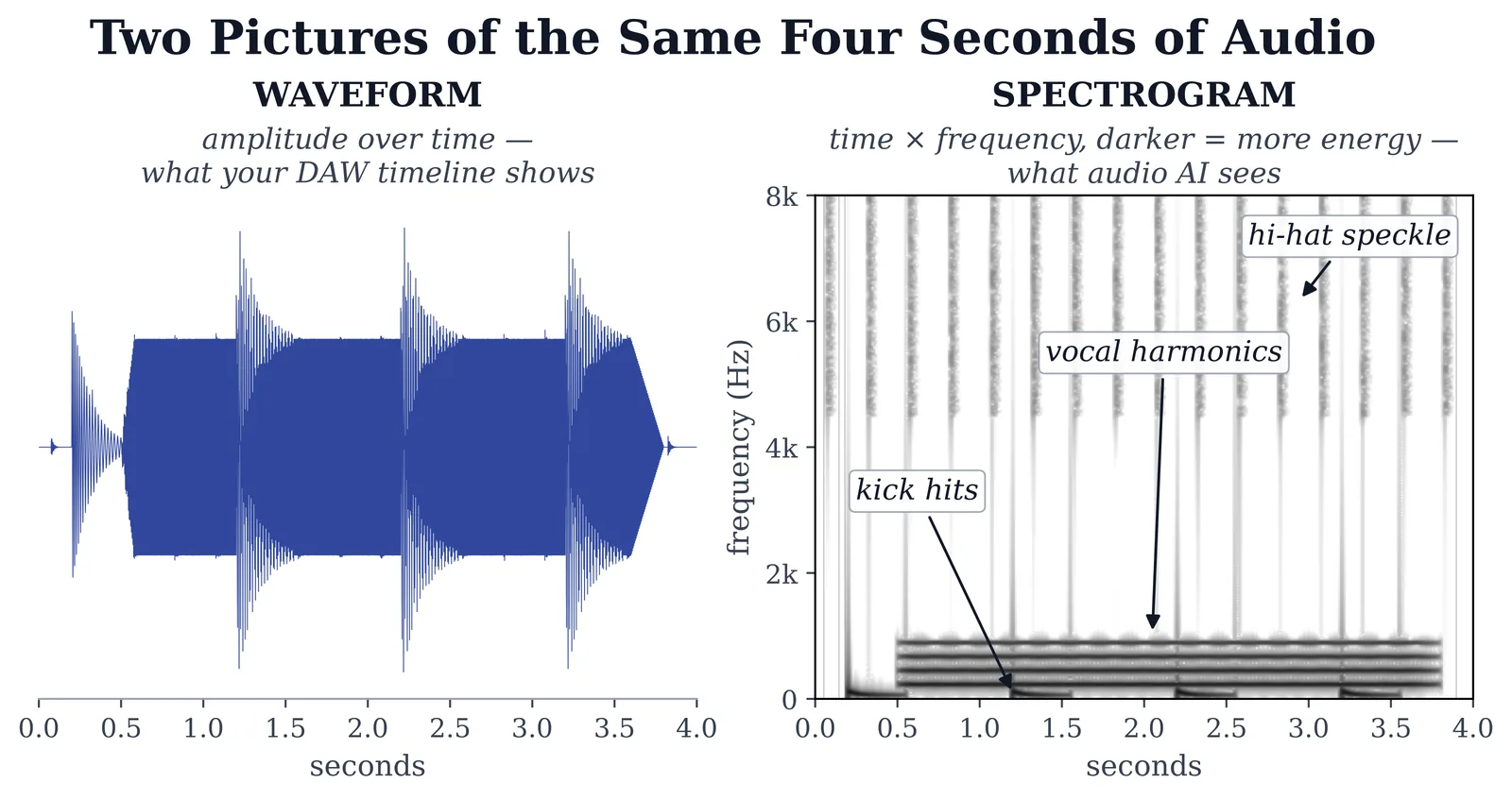
Convolutional Neural Networks (CNNs) — are the workhorses of audio AI, and the connection to audio is not obvious until you see it. CNNs were originally built for image recognition—identifying cats in photographs, reading handwritten digits, detecting tumors in X-rays. But audio can be represented as a spectrogram: a visual image where the x-axis is time, the y-axis is frequency, and brightness represents amplitude (Pohlmann, 2010). A CNN looks at that spectrogram the same way it looks at a photograph—scanning for patterns, edges, and structures. When iZotope RX identifies and removes a cough buried in the middle of a vocal take, or when a stem separation tool pulls the drums out of a finished mix, the model is reading a spectrogram with CNN architecture. It is literally looking at your audio.
Transformers — are the architecture behind ChatGPT, Claude, Gemini, and every large language model making headlines. Transformers process sequences using a mechanism called “attention”—the model weighs how important each piece of input is relative to every other piece. In text, this means it understands that “bass” refers to a low-frequency instrument when preceded by “electric” but a fish when preceded by “largemouth.” In audio, transformer architectures are increasingly used for music generation, lyrics generation, and audio understanding. If you have used ChatGPT to help brainstorm arrangements or write session notes, you have used a transformer.
Diffusion Models — power many generative AI tools. They work by starting with pure noise—literally random static—and gradually refining it, guided by a text prompt or reference signal, until something coherent emerges. Think of a sculptor starting with a rough block of marble and chipping away everything that does not belong. Except this sculptor is guided by mathematics, not intuition, and it finishes in seconds. Stable Audio and many AI image generators use diffusion architecture.
Audio Tokenization — is how AI learns to “speak” audio. Just as text gets broken into words and subwords before an LLM processes it, continuous audio waveforms get broken into discrete tokens—a vocabulary of sound units. Meta's EnCodec and Google's SoundStream are neural audio codecs that compress audio into sequences of tokens that can be processed by language model architectures. This is the mechanism that allows tools like MusicGen to generate audio the way ChatGPT generates text—by predicting the next token in a sequence. When someone says AI can “compose” music, this is how.
Why does any of this matter to you as an engineer? Because the next time a company tells you their plugin “uses AI,” you now have the vocabulary to ask: what kind? A CNN analyzing spectrograms for noise reduction is a sophisticated signal processing tool with clear, predictable behavior. A diffusion model generating music from a text prompt is a creative engine with entirely different capabilities, limitations, and ethical implications. These are not the same technology, and the engineer who understands the difference will make better decisions about which tools to trust, which to question, and which to ignore.
How AI Audio Models Actually Run
suggest a correctionKnowing what a transformer or diffusion model is gives you the vocabulary. Knowing how these models actually run in production tells you whether a given tool fits your studio, your budget, and your privacy constraints. Four distinctions matter for working engineers today.
Training vs. Inference
Every AI model has two phases. Training is the expensive one—the model is fed millions or billions of examples on massive GPU clusters (often hundreds of Nvidia H100 or Blackwell B200 cards running for weeks) until it learns to predict. Stability AI reportedly trained Stable Audio on around 800,000 stock audio files; OpenAI's Whisper was trained on 680,000 hours of multilingual speech. Training a foundation audio model from scratch costs millions of dollars in compute—almost certainly more than you will ever spend, so in practice you will use models other people trained. (Never say never, but foundation-model training is a data-center endeavor, not a studio one.) Inference is what happens when you actually use the model—the trained weights are loaded, your input goes in, the output comes out. Inference is dramatically cheaper than training; a single ElevenLabs voice generation costs a fraction of a cent in compute. Almost every audio AI tool you will encounter is inference-only: someone else trained the model, you are renting (or downloading and running) the inference. Understanding this is why “the model” is sometimes a free download you run locally, and sometimes a per-minute API fee.
Open Weights vs. Closed APIs
The audio AI landscape is split between two business models, and the split affects what you can use, how, and at what cost. Open-weight models publish the trained model parameters; you can download and run inference yourself. Meta's MusicGen (3.3B parameters), Meta's AudioCraft suite, OpenAI's Whisper (39M to 1.5B parameters depending on size), Demucs (~40M), Spleeter (Deezer), so-vits-svc, RVC, and Stable Audio Open all live in this camp. Advantages: zero per-use cost after download, full privacy (audio never leaves your machine), ability to fine-tune on your own material. Trade-off: you need hardware to run them, and the largest open models often trail the closed state-of-the-art by 6–12 months. Closed-API models are accessible only through the vendor's service. Suno, Udio, ElevenLabs, Resemble AI, AIVA, and most commercial mastering services run this way. You pay per use, the audio uploads to their servers, the model itself is not available to you. Reverse trade-off: easier to use, no hardware requirements, but per-use cost and the data leaves your studio. Knowing which camp a tool sits in is the first question to ask before adopting it.
Local vs. Cloud Inference
Where does the audio actually go? On open-weight models you run locally, the audio never leaves your studio—privacy by default. Apple Silicon (M3/M4 Max with up to 128 GB unified memory) and Nvidia RTX 4090 / 5090 GPUs can run most modern audio models in real time or faster on a working studio machine. Whisper Large runs on a five-year-old laptop. Demucs separates a five-minute song in about thirty seconds on a Mac Mini. Stable Audio Open runs on a single consumer GPU. On closed-API tools, the audio goes up to the vendor's servers, gets processed, comes back. For most commercial work this is fine. For confidential material—NDA work, unreleased catalog, attorney-privileged audio, sensitive documentary content—it may not be. Read the vendor's terms of service for data retention, training rights (some vendors train on user uploads by default), and deletion policy before uploading anything you do not fully own.
Fine-Tuning: Customizing a Model on Your Data
The third state of any AI model lives between training and inference: fine-tuning. Take a foundation model someone else trained on millions of examples, then continue training briefly on a much smaller, more targeted dataset—your voice, your studio's house sound, a specific producer's drum library. The base model already speaks audio fluently; fine-tuning teaches it your accent. so-vits-svc and RVC both adapt a pretrained backbone to a target voice from a few hundred seconds of audio—though they differ under the hood: so-vits-svc trains a VITS-based model on the target, while RVC builds a retrieval index it draws on at inference rather than fine-tuning end to end. ElevenLabs Professional Voice Cloning is fine-tuning behind a clean UI. Modern techniques like LoRA (Low-Rank Adaptation) and QLoRA—borrowed from large-language-model fine-tuning and increasingly applied to audio models—make fine-tuning cheap enough to run on a single consumer GPU; you no longer need a data center. Fine-tuning is how a professional differentiates from someone using the same off-the-shelf tool: your model learns your sound, your library, your artist's voice, while everyone else gets the generic baseline. Privacy implications follow open-vs-closed: fine-tuning an open-weight model on your local machine keeps the training data yours; fine-tuning through a closed API uploads your training data to the vendor. Read the terms.
Audio Quality Metrics: How the Field Actually Evaluates AI
How do researchers and pro reviewers evaluate AI audio when the obvious answer (“listen to it”) does not scale? Three metrics dominate the technical literature, and knowing them lets you read research papers and product release notes critically. FAD (Fréchet Audio Distance) compares the statistical distribution of generated audio against a reference set of real recordings—lower scores mean the AI output is statistically closer to real audio. CLAP (Contrastive Language-Audio Pretraining) score measures how well an audio output matches the text prompt that generated it—higher means the prompt was better honored. MOS (Mean Opinion Score) is the human-listener rating on a 1–5 scale, the same metric the telecom industry uses for call quality. When a paper claims “state-of-the-art,” it is almost always citing FAD or CLAP improvements over prior models. When Suno or Udio releases a version claiming “2× vocal realism,” the underlying number is usually a MOS or FAD delta. Understanding the metrics is what separates measured progress from marketing copy—and the engineers who can read the literature will be ahead of the engineers who only read the press release.
Large Language Models vs. AI Music Generation
suggest a correctionThis distinction trips people up constantly, so let us be precise: LLMs and music generation systems are fundamentally different technologies solving different problems. They are starting to merge—and that intersection is where things get wild—but you need to understand them separately first.
Large Language Models (ChatGPT, Claude, Gemini) are trained on massive text datasets. They generate text by predicting the most probable next word in a sequence. They are shockingly useful for audio professionals—not for making sound, but for everything around it:
- Brainstorming song concepts, arrangements, and creative directions
- Writing lyrics in specific styles, meters, and rhyme schemes
- Drafting session notes, metadata, liner notes, and marketing copy
- Explaining technical concepts you half-remember from Chapter 2
- Generating contract language, business emails, and client communications
- Breaking through creative blocks at midnight when no collaborator is awake
Here is the critical limitation: LLMs do not hear anything. An LLM can write lyrics that rhyme and scan perfectly, but it has zero idea whether those lyrics sit well on your melody. It can describe a chord progression in words but cannot evaluate whether that progression creates the emotional arc you are going for when it is actually played. Text in, text out. That is the boundary. Respect it.
AI Music Generation systems—Suno, Udio, Stable Audio, Meta's MusicGen—are purpose-built to create audio, not text. They are trained on music datasets (which raises serious copyright questions we will address later) and output waveforms or spectrograms. These systems produce surprisingly convincing music in seconds. But they operate on pattern matching, not musical understanding. They generate music that sounds like a genre. They struggle to create music that says something within a genre. That is a distinction worth thinking about.
The intersection is where things get interesting. Multimodal models that process both text and audio are emerging fast. Imagine describing what you want in plain English—“a dusty, lo-fi hip-hop beat with a jazz piano sample, pitched-down vocal chop, and heavy side-chain on the kick”—and hearing a usable starting point ten seconds later. That workflow exists today, imperfectly. It will be dramatically better by the time you finish this book—this field moves in weeks, not years.
A defining frontier is native audio in and out of large models. OpenAI's GPT-4o was among the first major models to accept audio input and generate audio output without converting through text in the middle—you can talk to it and it talks back, in real time, with conversational latency, and its successors have pushed the fidelity further. Google's Gemini Live works similarly; Claude's voice mode, by contrast, still routes speech through a text pipeline—a reminder that “voice” on the label does not always mean native audio under the hood. Inside a few years, the boundary between LLMs and music generation systems will mostly disappear. The systems that today require switching between tools (one for lyrics, one for melody, one for arrangement, one for vocals, one for mix) will collapse into single multimodal models that handle the full chain. Plan your career around that trajectory, not around any specific tool that exists right now.
Voice Synthesis and Vocal AI
suggest a correction“We haven't yet figured out how to deal with intellectual property in pre-digital music, and AI is like if a sample could sprout legs and run. It is recording technology 2.0, and we don't have an ethical framework.”
—Holly Herndon, electronic musician and creator of Spawn (her AI voice twin)
Herndon has been ahead of every conversation about AI vocals since she trained “Spawn,” a neural network on her own and her ensemble's voices, in the years before her 2019 album PROTO. Her warning is the right framing for this section: the technology is here; the ethical framework is not. We are building the framework as the tools are deployed, in real time, on real records.
This is the section that will either excite you or terrify you. Probably both. And that is the correct response.
AI can now clone a human voice from thirty seconds of audio. Not a robotic approximation. A convincing replica with the speaker's timbre, cadence, and inflection. Sit with that. Thirty seconds of someone talking, and a system generates hours of new speech in that voice saying anything you type. The implications for every corner of the audio industry are enormous.
Text-to-Speech (TTS) — systems like ElevenLabs and Resemble AI generate natural-sounding speech from text with controllable emotion, pacing, and delivery. Podcast producers use them for narration. Video editors use them for voiceover. Audiobook publishers are deploying them at scale. The quality crossed the threshold several years ago where most casual listeners cannot tell the difference between AI and human speech.
Voice Cloning — goes further. Upload a few minutes of sample recordings—more than an instant clone needs, in exchange for higher fidelity—and these platforms build a synthetic model of that specific person's voice. The legitimate applications are real: preserving a voice actor's instrument for continued use across projects, dubbing content into other languages while keeping the original speaker's voice, generating consistent narration across long-form content without marathon recording sessions. But the potential for abuse is obvious—and the law is racing to catch up. We will get to that.
AI Singing Voice Synthesis — is the frontier that hits closest to home for music producers. Open-source projects like so-vits-svc and RVC, along with commercial platforms, can transform a melody hummed by a producer into a fully realized vocal performance in a chosen voice style. A producer with no singer in the room can generate a demo vocal that sounds like a real human being. The quality is not flawless—artifacts still appear under close listening, especially in breath patterns, emotional dynamics, and consonant transitions—but it improves with every model update. What sounded obviously synthetic a year ago passes casual listening today.
Here is the honest career assessment. If your primary value as a session vocalist is singing competent, interchangeable demo tracks, AI is coming for that work fast. If your value is emotion—the ability to interpret a lyric, improvise a run that nobody asked for but everybody needed, take direction from a producer in real time and deliver something that makes the room go quiet—you are irreplaceable. The same principle applies across every role in audio: commodity work gets automated; craft does not.
The professional ground rules are simple and non-negotiable: never clone a voice without explicit consent. Disclose AI-generated vocals in credits and metadata. Clarify voice content ownership and usage rights in every contract. And train your ears—AI vocals still have tells if you know where to listen.
AI Lyrics and Songwriting
suggest a correctionThree in the morning. The artist has a melody but no words. The instrumental is locked, the vibe is right, and if you kill the momentum now you might not get it back. So you pull out your phone, open ChatGPT, and type: “Write four variations of a second verse. Theme: leaving a relationship but feeling relief instead of sadness. Rhyme scheme ABAB. Keep it conversational, not poetic.” Thirty seconds later you have raw material. The artist reads them, grabs a line from version two and a phrase from version four, rewrites the rest in their own voice, and records the vocal in one take. Session saved.
That is AI-assisted songwriting at its best—a tool that generates momentum, not a replacement for the artist.
Current LLMs can produce lyrics in specific styles, meters, and rhyme schemes on demand. They can shift perspective, rewrite in different emotional tones, and produce twenty variations in the time a human might produce three. Specialized platforms like LyricStudio offer songwriter-specific features—syllable counting, rhyme databases, genre-aware vocabulary suggestions.
The limitations are exactly what you would expect. AI lyrics gravitate toward cliché because the models optimize for statistically common word choices. They have no lived experience—no heartbreak at 4 AM, no inside jokes, no memory of a specific smell that triggers a specific feeling. The best songwriting comes from specificity: details that only you know, images that only you have seen. AI generates generalities. That is a fundamental limitation, not a temporary one.
The workflow that actually works: use AI to generate volume. Twenty variations, fifty rhyme options, ten different angles on the same concept. Then cherry-pick the strongest fragments and rewrite them in your own voice. The AI is a brainstorming partner that never sleeps, never judges a bad idea, and never needs to be credited—because it did not write the song. You did.
A critical note on copyright: under current U.S. Copyright Office guidance, works generated entirely by AI without meaningful human creative input are not eligible for copyright protection (U.S. Copyright Office). But works that involve substantial human authorship—where AI serves as a tool in a human-directed creative process—can be registered. If you use AI to generate a rough draft and then substantially revise, restructure, and rewrite it, the final work is almost certainly copyrightable. If you click “generate” and release the output unchanged, it probably is not. Document your creative process. Save your drafts and revisions. This matters more than most emerging artists realize.
Generative AI and Music Creation
suggest a correctionRemember that student and his eleven-second beat? That is where generative AI stands today. Tools like Suno, Udio, Google's Lyria (the model behind MusicFX and Dream Track), and Meta's open-source MusicGen can produce complete songs—vocals, instruments, arrangement, production—from a text description. Platforms like AIVA focus on cinematic and classical composition. Stable Audio generates custom audio from detailed prompts. The output quality ranges from genuinely impressive to deeply unsettling.
For you, this technology creates both opportunity and threat. You need to understand both clearly.
The opportunity is real and immediate. Rapid prototyping—generate five different arrangement concepts before you commit a single hour of studio time. Scratch tracks—create placeholder vocals and instruments for client approvals before booking musicians. Custom background music—produce tailored beds for video projects at a fraction of the traditional cost and turnaround. Sound design—explore textures, timbres, and combinations you would never stumble onto through manual experimentation. These applications genuinely save time and expand creative possibilities for working professionals.
The disruption is equally real. Low-budget projects that previously hired a producer may use AI-generated music instead. Stock music libraries—a legitimate income stream for many composers and producers—face direct competition from generators that create unlimited custom tracks for the price of a monthly subscription. The barrier to entry for “making music” drops to zero, which floods the market with content, which means standing out requires more skill and taste, not less.
Here is what I have observed working with these tools on a daily basis: AI-generated music is impressive on first listen and hollow on the fifth. It optimizes for surface-level patterns—the chord progressions that appear most frequently in its training data, the drum patterns that match the genre tag, the vocal melodies that resolve predictably. It sounds like music. It rarely feels like music. The subtle tension of a pre-chorus that delays resolution by one beat, the vocal ad-lib that references a gospel tradition the listener feels without naming, the chord substitution that makes a bridge land differently than the verse—those decisions come from a human being who has lived inside music and has something to say. AI has nothing to say. It has patterns.
That distinction is your career insurance. But only if you actually develop something to say.
Prompting as a Production Skill
I typed “make a hip-hop beat” into Suno my first week with the tool and got exactly what that deserves: a competent, forgettable loop that sounded like every other competent, forgettable loop the model had ever produced. I typed “boom-bap, 88 BPM, dusty Rhodes piano chop, swung hi-hats, vinyl crackle, minor key, early-90s East Coast” and got something I actually wanted to listen to. Same model. Same session. Completely different result. The difference was the prompt.
Prompt engineering is the skill of describing a musical idea in precise, layered language that a generative model can act on. It is not a workaround or a hack—it is the interface. On tools like Suno, Udio, Stable Audio, and text-to-sound generators like those built on Stability AI's open-weight Stable Audio model, the prompt is the instrument. Learning to play it matters as much as learning to program a drum machine.
Prompt Levers — the dimensions that a generative model responds to. Six cover most of the ground:
- Genre and subgenre. “Hip-hop” is a continent. “Boom-bap” is a city block. The more precisely you locate the subgenre, the less interpretation the model has to do on its own—and the less likely it is to average across unrelated influences.
- Tempo. State it in BPM. “88 BPM” is a constraint; “slow” is a suggestion.
- Instrumentation. Name the instruments and their character. “Rhodes piano” specifies an electromechanical keyboard with a particular frequency shape and attack. “Keyboard” specifies nothing. “Dusty Rhodes piano chop” adds the processing context that tells the model you want a sampled, slightly degraded sound—not a pristine recording.
- Mood and emotional register. Adjectives that describe feeling, not just genre: melancholic, urgent, sparse, cavernous, claustrophobic. Models trained on annotated music data respond to these; they correspond to real patterns in the training set.
- Era and reference style. “Early-90s East Coast” invokes a production vocabulary—specific compression curves, drum machine character, the SP-1200 grit and pitch-down artifacts—that a model learned from the music of that period. “Vintage” does less work; the machine does not know which vintage you mean.
- Sonic texture descriptors. Words that describe what the mix feels like sonically: “vinyl crackle,” “tape saturation,” “room bleed,” “bitcrushed.” These are production signatures that trained models recognize as timbral fingerprints.
The workflow that actually produces usable results is iterative. Start with four or five strong descriptors, generate several variations, then adjust one lever at a time: push the tempo, swap an instrument, add a texture tag, shift the era reference. Treat each generation as a draft, not a verdict. The models reward specificity and iteration; they punish vague single-pass prompts.
This skill transfers directly across platforms. Suno and Udio both weight the beginning of the prompt more heavily—put genre and the most critical sonic characteristic first. Stable Audio's text-to-audio mode responds well to instrumentation and texture descriptors even for short-form sound-design work (drum hits, foley, ambient beds). The vocabulary differs slightly, but the underlying principle is the same: the more precisely you can describe what you hear in your head, the closer the model can get to it on the first pass. That precision is a production skill, and it is trainable.
AI in the Studio: Mixing, Mastering, and Production
suggest a correctionNow let us talk about the AI tools that are already changing daily studio work. I am going to focus on what they do and how to think about them—not on cataloging every product on the market. That list changes faster than any textbook can keep up with. A reference table is included at the end of this chapter for the tools worth knowing today.
AI-Assisted Mixing and Mastering
The first generation of AI mixing tools were glorified presets with better marketing. Upload a track, get a mediocre result, wonder why you bothered. The current generation is a different animal. Tools like iZotope's Ozone Master Assistant and Neutron Mix Assistant analyze your audio and generate intelligent starting points for EQ, compression, imaging, and limiting. Sonible's smart:EQ and smart:comp apply real-time processing that adapts to the input signal on the fly. These tools are fast, competent, and increasingly hard to ignore.
The key word is “starting point.” I use AI suggestions the same way I use a rough mix from an assistant—as a conversation starter, not a final answer. The AI can analyze frequency content and detect masking between instruments faster than any human ear. What it cannot do is hear that the vocalist sounds emotionally exposed because the artist just went through a breakup, and the mix needs to feel intimate, not polished. It cannot know that the bass player's slightly-behind-the-beat feel is intentional and should not be quantized. It cannot sense that the room needs the monitors turned down because the client is overwhelmed and too proud to say so. Those are creative and human decisions, and they are the ones that define great records.
AI Stem Separation
Five years ago, pulling individual instruments out of a finished stereo mix was impossible. Today it is routine. Tools like iZotope RX's Music Rebalance, Meta's open-source Demucs, and services like LALAL.AI and Moises.ai can separate a mixed-down recording into vocals, drums, bass, and other instruments—with results that range from impressive to nearly transparent.
The applications are transformative. Remixing legacy recordings where multitrack stems were lost or never existed. Isolating vocals for sampling, remix work, or clearance. Cleaning dialogue from noisy production audio. Creating instrumental and a cappella versions without access to the original session. Mastering engineers can now adjust individual stem levels within an already-mixed stereo file—a capability that five years ago would have been dismissed as fantasy.
Each generation of these models produces cleaner, more transparent separation. What sounded obviously processed and metallic just a few years ago sounds natural today. The trajectory is clear, and it will continue.
AI in Post-Production
Post-production adopted AI tools faster than any other audio discipline, for a straightforward reason: post tasks tend to have objectively measurable outcomes. “Remove the noise” is a problem with a right answer. “Make this mix feel nostalgic” is not. AI excels at the former.
iZotope RX's AI-powered Repair Assistant identifies and removes noise, hum, clicks, and reverb with minimal artifacts. Manual spectral editing that used to take hours now takes seconds. Adobe's podcast enhancement tools clean up speech automatically. AI transcription systems identify speakers, generate timecodes, and align replacement dialogue (ADR) with original lip movements—tasks that were tedious and time-consuming for human editors.
If you are heading toward a career in post-production, fluency with these AI tools is not a competitive advantage. It is the baseline expectation.
AI Transcription and Speech-to-Text
Forty takes of a single chorus, every one starting with the same three words: “never let me go.” The artist wanted the best take of every line, comped together. The old way: scrub through forty waveforms, ear-mark each phrase, write down playlist coordinates, build the comp by hand. An afternoon of work, minimum.
The new way: Pro Tools' Transcription Lane—a built-in AI speech feature that transcribes vocal performances directly to the timeline. Each phrase becomes a clip-aligned text annotation you can search, navigate, and reference like any other Pro Tools metadata. Search “never let me go,” jump between every take of that line, audition them against each other, build the comp in ten minutes instead of an afternoon. The technology has been in research papers for years; it is now in the DAW most pros open every day.
For podcast and dialogue work, AI transcription has moved from convenience to expectation. OpenAI Whisper (open source) handles long-form transcription at remarkable accuracy across accents and languages. WhisperX extends Whisper with speaker diarization (who said what, when) and word-level timestamp alignment—essential for editing multi-speaker podcasts. Descript wraps these models in a workflow where you edit the audio by editing the text—delete a sentence in the transcript and the audio deletes with it—while Otter.ai focuses on transcription and meeting notes (you can edit the text, but the underlying audio stays put). For long-form content (podcasts, interviews, audiobooks, documentary post), this is the workflow now, not a side tool.
Privacy matters increasingly in this category. Documentary editors handling sensitive material, journalists with confidential sources, attorneys with privileged audio—all of them need transcription that does not upload to a cloud. StemDesk™ (in development) is being built around a local faster-whisper transcription module (with optional WhisperX word-alignment) designed to run entirely on the engineer's machine—no cloud upload, no per-minute pricing, no privacy concerns. Local-only transcription is increasingly the requirement, not the option.
Other AI Applications Worth Knowing
AI is also reshaping vocal tuning—Auto-Tune and Melodyne now incorporate AI-driven pitch detection that preserves natural vibrato and expression rather than forcing rigid correction. Sample discovery tools like Splice's AI search and XLN Audio's XO use machine learning to categorize and recommend sounds by timbral characteristics, key, and tempo. Spatial audio workflows increasingly use AI for automated upmixing to Dolby Atmos and intelligent object placement in 3D space. And prompt engineering—the skill of describing what you want in precise, specific musical language—is becoming a production competency in its own right.
AI Built Into Your DAW
A client handed me a session last fall and asked me to “make it more musical.” Before I touched a single plugin, I pulled up the DAW's own tools and had a bass line, chord voicings, and a rough stem split done in under ten minutes—without installing a single third-party add-on. The point: you may already own more AI than you realize.
The tools covered in the rest of this chapter are mostly discrete software products—you evaluate them, purchase them, install them, and route them into a session. There is a parallel category worth treating separately: DAW-native AI, assistive and generative tools baked directly into the host, available the moment you open a project. No plugin window, no licensing server, no extra download. Every major host now ships with at least one.
Ableton Live includes a suite of built-in MIDI Generator and Transformation tools accessible directly in Clip View. These are not machine-learning models—they are probabilistic and algorithmic—but they are tightly integrated with Live's global scale awareness, so generated pitches stay in key automatically. The Stacks generator builds chord voicings and progressions within the active scale; Rhythm, Seed, Shape, and Euclidean generators cover groove and melodic territory. Evaluate them on the same axis as any ML tool: do the results serve the track, or do they need your ear to finish the job? The answer is always the second.
Logic Pro shipped two genuinely ML-trained additions. Session Players—a Bass Player and Keyboard Player joining the longstanding Drummer—were trained “in collaboration with today's best bass players,” according to Apple, using advanced AI and sampling technologies. They respond to a Chord Track and accept complexity and intensity controls. They are not a substitute for a session musician with taste, but for a producer working without one they close the gap considerably. The same update added Stem Splitter, on-device separation into Drums, Bass, Vocals, and Other Instruments, running entirely on Apple Silicon without any cloud upload.
Studio One (now Fender Studio Pro) added native AI-powered stem separation—right-click any audio event and choose Separate Stems. The algorithm isolates Vocals, Drums, Bass, and Other into new tracks inside a Folder, processing locally on your machine.
Steinberg Nuendo introduced Adaptive Background Attenuation (ABA) — developed by Fraunhofer IIS, ABA uses the dialogue stem as a reference and automatically attenuates competing background sounds to a user-defined margin, keeping speech intelligible without manual gain rides. For post-production work with complex background beds, this is one of the most practical AI additions any DAW has shipped in years.
iZotope RX now ships Dialogue Isolate as a real-time VST 3 plugin, not only as a standalone module—meaning you can run it as an insert on a dialogue track inside any compatible DAW without leaving the session. The Repair Assistant module similarly deploys neural-network analysis for clipping, clicks, hum, noise, reverb, and sibilance as a starting point you refine by ear.
The common thread: all of these run locally, and all of them produce a starting point rather than a finished decision. Apply the five-step evaluation this chapter lays out—what kind of AI, what was it trained on, where does the audio go, what are the output rights, how does it A/B against your own work—and these tools earn their place in the session on merit, not marketing. The fact that they ship inside your DAW does not exempt them from critical thinking. It just means you have less excuse not to try them.
What AI Cannot Replace
suggest a correction“The biggest problem for me about AI is not intrinsic to AI. It's to do with the fact that it's owned by the same few people.”
—Brian Eno, MusicTech, on the politics of AI in music (2025)
Eno has been thinking about machine creativity since the 1970s—his Oblique Strategies cards and Music for Airports were both early experiments in algorithmic composition. He calls a chunk of what AI does today “artificial stupidity”: the model makes weird mistakes, and a few of those mistakes are interesting in ways no human would have arrived at intentionally. Useful framing for what comes next. The technology has remarkable capabilities. The technology also has limits that matter more than its capabilities, and those limits are what define a career in audio that lasts.
I want to spend real time here, because this section matters more than every tool I have listed in this chapter combined.
Taste. An AI can optimize every parameter in your session and produce a mix that is technically flawless—balanced frequency spectrum, zero masking, ideal loudness, textbook stereo image. And it might sound like absolutely nothing. Because taste is not optimization. Taste is the decision to let the vocal distort slightly on the chorus because it sounds desperate and that is what the song needs. Taste is pulling the reverb completely out of the bridge so the room feels smaller and more honest, then flooding it back on the last chorus so the listener's chest opens up. Taste is knowing that the “wrong” choice is sometimes the right one. No algorithm arrives at those decisions, because no algorithm understands why they matter.
The room at 2 AM. I have been in sessions where the vocalist was three hours deep and losing confidence. The takes were not working. The producer was getting visibly frustrated. And the move that saved the session was not a plugin or a setting change—it was dimming the lights, putting on a completely different song for twenty minutes, and telling the artist a story about a session where I completely bombed. They laughed, relaxed, forgot about the pressure, and nailed it on the next take. An AI cannot read a room. It cannot manage a human ego. It cannot be the person who says, “That one—that is the take,” and have the artist believe it because they trust you. That trust is built over hours of shared work, shared vulnerability, and shared silence. It cannot be computed.
Cultural context. Music does not exist in a vacuum. A gospel mix and a trap mix are not just different frequency profiles—they carry different histories, different communities, different emotional vocabularies, and different expectations about what “right” sounds like. A great engineer knows that a lo-fi hip-hop beat is supposed to sound slightly imperfect because the aesthetic descends from MPC sampling culture and the crackle is part of the language. They know that a Nashville vocal sits higher in the mix than a UK grime vocal because the genres have different relationships to the voice. That knowledge comes from living inside music, not from analyzing training data.
Problem-solving under pressure. The session is going sideways. There is a ground loop buzzing through the monitors that was not there yesterday. The client changed the key an hour before the vocalist arrived. The hard drive is full and the backup drive is in someone's car. These are not algorithm problems. These are human problems that demand diagnosis, improvisation, and the ability to stay calm while a room full of people are waiting for you to fix it. The best engineers I know are not the ones with the most expensive gear or the longest plugin chains. They are the ones who can solve any problem in the room—technical, interpersonal, or creative—and keep the session moving forward without breaking the vibe.
Accountability and reputation. When a major label is paying for a mix, they want a name on the record. A human being who stakes their professional reputation on every decision. Someone the artist can call at 11 PM to discuss a mix revision. Someone who cares whether the record works—not because of an objective function, but because their name is on it. AI does not have a phone number, a career to protect, or a reason to care. You do. That matters.
The engineers who will thrive in the next decade are not the ones who fear AI, and they are not the ones who worship it uncritically. They are the ones who master both the technology and the human skills that no technology can replicate. That has been true at every inflection point in this industry's history. Tape machines changed the game, and the great engineers adapted. DAWs replaced tape, and the great engineers adapted again. AI will automate some tasks and eliminate some roles—and the great engineers will adapt once more. The question is not whether the shift is coming. It is whether you will be the one who rides it or the one it leaves behind.
The Ethics and the Law
suggest a correction“I'll split 50% royalties on any successful AI generated song that uses my voice. Same deal as I would with any artist I collab with. Feel free to use my voice without penalty.”
—Grimes, on X (formerly Twitter), April 23, 2023
Grimes posted that statement days after the fake Drake/Weeknd track went viral. It is one model for how the consent-based future of AI voice work might function: explicit permission from the original artist, royalty split codified in advance, voice rights treated as a feature artists license rather than a violation labels chase. Most artists have not gone this far. The ones who do are designing the framework everyone else will eventually live inside.
In 2023, a track appeared on streaming platforms featuring what sounded like Drake and The Weeknd performing together. It went viral—millions of streams in days. Then Universal Music Group had it pulled. The vocals were generated entirely by AI. No consent was given. No license was signed. And the legal system had almost no framework for dealing with it.
That incident forced a reckoning the music industry had been avoiding: who owns what when AI is involved?
Training data and copyright. Most AI music generation models were trained on copyrighted recordings without permission from or compensation to the original artists. In June 2024 the RIAA, on behalf of Sony Music Entertainment, Universal Music Group, and Warner Records, filed federal lawsuits in Massachusetts and New York against Suno and Udio—the two largest commercial music generators. The complaints allege willful copyright infringement at “almost unimaginable scale,” seeking statutory damages of up to $150,000 per infringed work (17 U.S.C.). Suno and Udio acknowledge training on internet-scraped audio but argue fair use—the same defense Google won in Authors Guild v. Google (2d Cir. 2015) for book scanning. Since then the front has fragmented: through late 2025, Warner Music and Universal each reached settlements and licensing deals with the AI companies (Warner with both Suno and Udio, Universal with Udio), while Sony Music continued to litigate against both—with a closely watched ruling expected in 2026. The central fair-use question was still unresolved as of this writing, and the eventual rulings will shape the music industry for decades. Whichever way they go, the principle they establish—about whether training an AI model on copyrighted recordings qualifies as fair use—will define the financial relationship between AI companies and the working artists whose recordings made the training possible. Pay attention.
Can you copyright AI-generated work? The U.S. Copyright Office has been unambiguous: works generated entirely by AI without meaningful human authorship cannot receive copyright protection. In February 2023, the Office ruled that AI-generated images in the graphic novel “Zarya of the Dawn” were not individually copyrightable, though the human-authored text and the overall selection and arrangement were protectable. The Office reaffirmed and sharpened this in its January 2025 report Copyright and Artificial Intelligence, Part 2: Copyrightability—which concluded that prompting alone, however elaborate, does not make the user the author of the output—and in March 2025 the U.S. Court of Appeals for the D.C. Circuit upheld the human-authorship requirement in Thaler v. Perlmutter. The principle for audio is identical. If you type a prompt and publish the raw output unchanged, you almost certainly cannot copyright it. If you use AI to generate raw material and then substantially edit, arrange, and produce the final work, your creative contribution likely establishes the human authorship required for protection. The practical takeaway: document everything. Save your prompts, your iterations, your editorial decisions, and your revision history. That paper trail is the difference between a protectable work and an unprotectable one.
Voice cloning legislation. Nashville moved first—because Nashville had the most to lose. The ELVIS Act (Tennessee, 2024) made it illegal to use AI to replicate a person's voice without consent for commercial purposes. The legislation was written because session musicians and artists in Music City saw the threat before the rest of the industry caught on. California followed with AB 2602 and AB 1836, extending protections to AI replicas of performers' voices and likenesses—including protections that extend beyond death. At the federal level, the NO FAKES Act would create a nationwide right against unauthorized AI voice replicas and has broad bipartisan support. The EU AI Act requires disclosure whenever content is AI-generated, including synthetic audio—affecting any professional distributing content in European markets.
The direction is unmistakable: the legal landscape is moving decisively toward mandatory transparency and consent. Professionals who build disclosure into their workflow now—labeling AI elements in metadata, credits, and liner notes—will be ahead of the regulatory curve. Those who try to pass off AI-generated content as human-created are building their career on a foundation that is actively being dismantled.
The ethical bottom line. Disclose what is AI-generated. Never clone a voice without explicit permission. Think critically about the humans whose work trained the models you use. These are not abstract philosophical positions—they are professional standards forming in real time, and the choices you make early in your career will define what kind of professional you become.
Provenance: Watermarks, Credentials, and Disclosure
suggest a correctionThe chapter's ethical bottom line is “disclose.” The industry's next question is “prove it.” A credit line in a liner note is a declaration. A provenance record is evidence. As AI-generated content floods every distribution channel, the infrastructure for verifying what was made by a human, what was made by a machine, and what was made by some combination of both is being built in real time—and working engineers need to understand it, because within a few years it will be the foundation every distribution dispute is argued on.
The Disclosure Gap
Disclosure without verification is an honor system. Honor systems work until they do not—and in a commercial environment where AI-generated tracks compete for the same playlist slots and sync licenses as human-made records, the incentives to misrepresent are real. Legislators and platforms both recognize this. The EU AI Act mandates disclosure of AI-generated synthetic audio, and the emerging U.S. frameworks covered earlier in this chapter trend the same direction. But a checkbox on a distributor upload form can be checked incorrectly, intentionally or not. The technical infrastructure being built alongside the legal one is designed to make provenance machine-readable, carrier-independent, and—where possible—tamper-evident.
C2PA and Content Credentials
C2PA (Coalition for Content Provenance and Authenticity) — a cross-industry technical standard that cryptographically binds provenance metadata to a media file. The record travels with the asset: who created it, what tools were used at each step, what edits were applied, and whether any AI was involved. Think of it as a chain-of-custody log for digital media—the same evidentiary logic a lawyer applies to physical evidence, applied to a WAV file.
The coalition is led by Adobe and includes Microsoft, Intel, Sony, Arm, and a growing number of media and platform partners. The consumer-facing implementation is called Content Credentials—a badge or manifest you can inspect to see the verified history of a piece of content. An image edited in Photoshop or a video produced in Premiere can carry a C2PA manifest showing each tool that touched it. The standard is architecture-agnostic and designed to extend across audio, video, documents, and images within a single framework.
For audio professionals, the practical implication is straightforward: if your DAW, AI tool, or distribution platform supports C2PA manifest generation, the provenance record embeds in the file at the moment of creation and survives through the delivery chain—provided no one strips it. That “provided” is the catch. Many upload pipelines—streaming platforms, social media ingest, transcoding services—strip or ignore embedded metadata as a routine part of processing. A C2PA manifest that disappears on upload to a streaming DSP offers provenance to the person who created the file, but not to the person streaming it. The standard's working groups are actively addressing this with detached manifests and hash-based verification, but strip-on-upload is a real-world limitation engineers should not gloss over. The record of what you made exists; whether every downstream recipient can verify it depends on the pipeline.
Audio Watermarking: SynthID and Its Class
While C2PA operates at the metadata layer—readable but removable—a parallel approach embeds the provenance claim inside the audio signal itself. Audio Watermarking — the practice of encoding a signal imperceptible to human hearing into the waveform at generation time, carrying information about the source AI system. Google DeepMind's SynthID is the most prominent deployed system in this class. SynthID embeds an imperceptible watermark directly into generated audio that is designed to survive common signal processing—lossy compression (MP3, AAC, Ogg), re-encoding, moderate pitch-shifting, and time-stretching—without audibly altering the content.
The verification workflow is asymmetric: only a system with the corresponding detection model can read the watermark. A listener cannot hear it; a human reviewer cannot see it in a waveform editor. Detection requires running the audio through the SynthID classifier, which returns a confidence score for whether the watermark is present. Google has deployed SynthID in its Lyria generative music models (the backbone of MusicFX and YouTube's Dream Track); audio generated through those systems carries the watermark by default.
The engineering tradeoffs are worth understanding. The watermark is robust to many transformations but not unconditionally indestructible—aggressive pitch manipulation, substantial re-recording through a speaker, or targeted adversarial processing can degrade or remove it. No watermarking system should be treated as a lock; it is more accurately described as a strong forensic indicator. For most commercial and legal contexts, a surviving watermark is meaningful evidence; its absence does not prove human origin, only that detection was inconclusive. Other generative audio systems are deploying comparable watermarking approaches—this is a class of technology, not a single product—but SynthID is the most publicly documented and widely deployed in the audio domain today.
Platform Detection and Labeling
Streaming platforms and social media services have moved from voluntary to mandatory AI-labeling frameworks. Spotify moved first among the music platforms: its 2025 policy update introduced DDEX-based AI credits—disclosing AI involvement granularly (vocals, instrumentation, post-production) rather than as a single AI/not-AI flag—banned unauthorized voice clones outright, and paired the disclosure system with aggressive spam filtering of mass-generated uploads. YouTube requires creators to self-disclose in upload settings when content is AI-generated or modified in a realistic way—including realistic AI voices—and applies “altered or synthetic content” labels. TikTok requires disclosure of AI-generated or AI-modified content and was the first major platform to auto-label incoming AI content by reading embedded Content Credentials.
The critical limitation: platform detection is probabilistic, not definitive, and enforcement is currently heavier on synthetic voice content (a high-visibility target) than on AI-generated instrumentation. What platforms can reliably flag today is a narrower category than what AI can generate. Treat platform labeling as one layer of a disclosure framework, not the whole one—because the layer that will survive a licensing dispute or a rights claim is the layer you control: the metadata you filed at distribution and the provenance records you kept.
Can You Hear It? AI-Audio Detection and Its Limits
The platform systems above lean on detection classifiers—models trained to distinguish generated audio from recorded audio—and it is worth understanding what those classifiers actually examine, because clients, instructors, and lawyers will all eventually ask you “is this AI?” Detectors look for statistical fingerprints of the generation process: vocoder and neural-codec artifacts in the high frequencies, spectra that are too smooth in regions where real rooms and real microphones leave noise, phase behavior too regular for acoustic capture, and the absence of a coherent noise floor (every real recording carries its room, as Chapter 7 taught; many generated tracks carry none). Trained ears catch some of the same tells—consonants that smear under scrutiny, breaths that land in grammatically convenient rather than physically necessary places, reverb tails that do not agree on what space they are in—though every one of these tells erodes with each model generation.
Now the limits, which are the real lesson. Detection is probabilistic: a score, not a verdict. False positives land hardest on exactly the music this book teaches you to make—heavily tuned, quantized, sample-built productions read as “synthetic” to a classifier because, in the literal signal sense, they partly are. And detection degrades under ordinary post-processing: re-record a generated track through a speaker and a microphone (worldizing it, in Chapter 20's vocabulary), EQ it, stretch it, and yesterday's detector shrugs. It is an arms race in which the detector is structurally behind—which is precisely why the industry is betting on the provenance infrastructure above rather than on forensics after the fact. The engineer's takeaway is double. Treat any detection score—including one aimed at your work—as evidence, never proof. And build your own provenance the unglamorous way: keep the session files, the raw takes, and the project history (Chapter 14's archive discipline). The engineer who can open the session and show the comp playlist does not need to win an argument with a classifier.
DDEX and Delivery-Pipeline Disclosure
The track does not just need a label on a streaming page—it needs the disclosure claim to travel with the asset through the commercial delivery chain. DDEX (Digital Data Exchange), the standards organization that maintains the metadata schemas used by distributors, aggregators, and DSPs to exchange rights and release information, published its AI-disclosure extension in late 2025 within its MEAD metadata specification: structured, machine-readable fields declaring whether—and where—AI contributed to a recording. Spotify's AI credits went live on exactly this standard in the spring of 2026. Implementation across distributors is still uneven and disclosure remains voluntary as of this writing, but the direction is set: the AI-involvement claim rides with the ISRC from delivery to streaming catalog, creating a verifiable chain that does not depend on any single platform's detection system. When your distributor's upload form grows an AI-credits section, this standard is what is underneath it.
The Working Engineer's Protocol
All of this infrastructure converges on one practical discipline, and it is one you already practice in a different context. In Chapter 21, the business chapter, the instruction is unambiguous: save everything—session files, contracts, splits, communications—because in a dispute, the party with better documentation wins. Provenance is that discipline applied to the creative record. Treat it identically.
The strategic logic here is the same logic that runs through every chapter of this book. The engineer who can prove which parts of a record are human owns the negotiation—with a label, a co-writer, a sync licensor, or a court. In the current environment, an undocumented AI claim and an undocumented human-authorship claim are equally weak. A timestamped prompt log, a saved session with discrete AI and human stems, and a distribution metadata record showing the disclosure was filed at release—that is a documented human-authorship claim. It is the difference between asserting that you made something and being able to demonstrate it.
The chapter has argued from the start that human judgment is the product. Provenance documentation is how you certify that the product is yours.
How to Use AI as a Tool
suggest a correctionAfter twenty-two chapters, here is the simplest framework I can give you:
Use AI for analysis, not for final decisions. Let it identify frequency masking, detect problems, and suggest starting points. Then use your ears and your taste to make the call. AI is a second opinion from someone who has listened to a million records but has never been moved by one.
Speed up the tedious. Invest the saved time in the creative. If AI handles noise reduction, gain staging, and rough balancing in seconds, that is an extra hour for reverb choices, automation rides, and the vocal treatment that makes a record special. The goal is not to work less. It is to spend your time on the work that matters.
Always A/B test. AI makes confident suggestions. Confident does not mean correct. If the AI recommends cutting 3 dB at 2.5 kHz and your ears say the track sounds better flat, trust your ears. Every single time. The AI has data. You have context. Context wins.
Learn the technology. You just spent several pages understanding neural networks, transformers, and diffusion models. That knowledge separates you from the engineer who clicks “auto” and hopes for the best. Treat AI fluency as a core professional skill alongside EQ, compression, and microphone technique.
Stay human. This is the most important point in this section. The most dangerous thing AI can do to your career is not to replace you—it is to make you lazy. If you stop training your ears because an AI plugin handles the EQ, if you stop learning microphone technique because AI can clean up anything in post, if you stop building relationships because clients can upload stems to a website—you have not been replaced by AI. You have replaced yourself. The tools change. The requirement to be excellent does not.
Evaluating an AI Audio Tool: A Five-Step Procedure
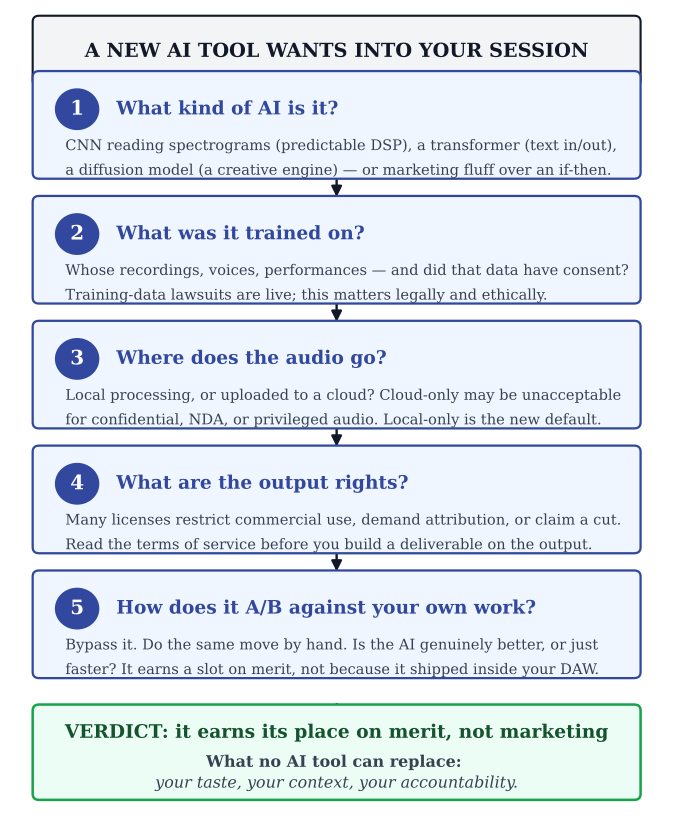
When a company tells you their plugin “uses AI,” run this evaluation before you adopt the tool:
- What kind of AI? CNN analyzing spectrograms (predictable signal processing), transformer doing language tasks (text in/out), diffusion generating audio (creative engine), or marketing fluff with an if-then statement underneath. The answer changes everything about what the tool can and cannot reliably do.
- What was it trained on? Whose recordings, whose voices, whose performances? Did the training data have consent? Was the model trained on copyrighted material without licenses? The answer matters legally (training data lawsuits are working through the courts) and ethically.
- Where does the audio go? Does the tool process locally or upload to a cloud? Cloud-only tools may not be acceptable for confidential content, NDA work, or privileged audio. Local-only is increasingly the requirement, not the option.
- What are the commercial-use rights of the output? Many AI tool licenses restrict commercial use of generated content, or require attribution, or claim a percentage. Read the terms of service before you build a deliverable on top of an AI output.
- A/B against your manual workflow. On real material from your projects. With your monitors. In your room. If the AI saves time without compromising the result, keep it. If it produces a different result that you cannot verify is better, override it. Confidence in the marketing is not the same as quality in the audio.
Run this five-step pass on every new tool. The vendors will keep evolving; your evaluation framework should not.
AI Audio Tools: Quick Reference (2026)
suggest a correctionThis landscape changes fast. Evaluate tools on their actual capabilities, not their marketing copy. Test with your own material. Compare against your manual results. Keep what genuinely improves your workflow and discard what adds complexity without value.
A note on this table's shelf life. This is a 2026 snapshot—the fastest-moving categories are music generation (Suno and Udio, already mid-litigation with the major labels as covered in “The Ethics and the Law” above, are still reshaping their ownership terms as labels settle and the remaining cases proceed) and voice and speech (ElevenLabs and competing platforms routinely revise consent requirements, commercial-use tiers, and geographic availability on short notice). Before building any production workflow around a specific tool in this table, confirm its current availability, pricing, and terms of service directly with the vendor—what applied when this chapter was written may not apply when you are reading it.
| Category | Notable Tools (2026) |
|---|---|
| Mixing & Mastering | iZotope Ozone / Neutron, Sonible smart:EQ / smart:comp / smart:limit, LANDR, StemDesk™ (in development), RoEx, Mixea |
| Stem Separation | iZotope RX, Meta Demucs (open source), LALAL.AI, Moises.ai, Spleeter by Deezer (open source) |
| Music Generation | Suno, Udio, Stable Audio, AIVA, Meta MusicGen (open source), Soundraw, Boomy |
| Voice & Speech | ElevenLabs, Resemble AI, Piper (open source), Amazon Polly, Microsoft Azure Neural TTS |
| Lyrics & Songwriting | ChatGPT, Claude, LyricStudio, Jasper AI |
| Noise Reduction & Restoration | iZotope RX, Waves Clarity Vx, Cedar Audio, Adobe Podcast, Acon Digital, StemDesk™ (in development) |
| Transcription & Analysis | OpenAI Whisper, Otter.ai, Descript, StemDesk™ (in development; local faster-whisper) |
| Sample Search & Organization | Splice AI, XLN Audio XO, Output Arcade, Algonaut Atlas |
| Spatial Audio | Dolby Atmos Renderer, AI-assisted upmixing tools |
| Vocal Processing | Auto-Tune (AI mode), Melodyne (ARA2), Synchro Arts RePitch |
Now Go Make Records
suggest a correctionTwenty-two chapters. Sound waves to artificial intelligence. A closet with blankets on the walls to the most powerful production tools in human history.
You are entering this industry at the most exciting inflection point since the invention of the DAW. AI will take over more of the routine work every year. That is not a threat—it is a liberation. Because the premium on creativity, taste, and human judgment is about to go up, not down. When everyone has access to the same AI tools, the differentiator is not the technology. It is the person using it. The engineer who combines deep technical knowledge with trained ears, genuine creative vision, and the ability to connect with the human beings in the room will not just survive the AI era. They will define it.
Everything in this book was built to make you that engineer. The physics, the signal flow, the mic technique, the mixing, the business, and now the AI—it is all one thing. It is the craft of translating what someone feels into what everyone hears.
Now close this book. Open a session. And go make something that makes somebody feel something.
Review Questions
Work these before moving on — every question is answerable from this chapter. Written answers live in the instructor Answer Key, available to course adopters.
- In your own words, explain the difference between a traditional audio plugin and an ML-based audio tool. Why does this distinction matter when evaluating new products?
- What is the difference between a Large Language Model and an AI music generation system? Give a specific example of how each could be useful to an audio professional.
- Describe the role of Convolutional Neural Networks (CNNs) in audio AI. What is a spectrogram, and why is it central to how AI “sees” sound?
- What is AI stem separation? Name two tools that provide it and describe a real-world scenario where it would be essential.
- A plugin company claims their new product “uses AI” to improve your mixes. Based on what you learned in this chapter, what specific questions would you ask to evaluate whether the claim is meaningful?
- List the five capabilities this chapter argues AI cannot replace in professional audio work. For each, explain in detail why it remains uniquely human.
- What is voice cloning, and what ethical and legal concerns does it raise? Name at least one specific law that addresses AI voice replication and explain what it requires.
- Under current U.S. Copyright Office guidance, can AI-generated music receive copyright protection? Explain the conditions under which a work involving AI might or might not qualify.
- Describe a practical studio workflow where you would use AI tools to save time without replacing your creative judgment. Be specific about which tasks AI handles and which the engineer handles.
- Discussion: A client asks you to generate an entire backing track using AI and release it commercially under their name. What ethical, legal, and creative considerations would you raise before proceeding?
- Walk through the five-step procedure for evaluating an AI audio tool. What does each step tell you?
- What is the difference between an open-weight model and a closed-API model, and why does that distinction matter when you are working on confidential or unreleased material?
- The chapter describes three layers of AI-provenance infrastructure: C2PA Content Credentials (metadata), SynthID audio watermarking (in-signal), and DDEX AI-disclosure credits (delivery pipeline). Evaluate each layer's strengths and weaknesses, then argue which layer provides the most durable protection for a working engineer in a licensing dispute—and explain why the other two, while valuable, are insufficient on their own.
Studio Exercise: Track 11 — AI-Augmented Workflow
The ten-track pipeline (Chapters 12 through 21) made you an audio professional. This final exercise tests whether you can integrate AI into that work without losing the craft you spent ten chapters building. Pick one AI tool and use it on a real project—an old session, your Chapter 19 master, your Chapter 20 picture cut, or new material—then document the workflow with the rigor you would apply to any other client deliverable.
Setup. Choose your AI tool. One only—do not stack five AI features on the same project. Categories to pick from: stem separation (LALAL.AI / Demucs / RX Music Rebalance), AI mastering (LANDR / Ozone Master Assistant), AI noise reduction (RX Repair Assistant / Adobe Enhance Speech), AI voice generation with documented consent (ElevenLabs with the speaker's written permission), AI transcription (Whisper / Pro Tools Transcription Lane), or AI mixing assist (Neutron / Sonible smart:EQ).
Part A — Document the Input. Save the source material before any AI touches it. Include the file in your submission. This is your before.
Part B — Run the Tool. Process the material. Save the raw AI output before you make any human adjustments. This is your AI baseline.
Part C — Apply Human Judgment. Override what the AI got wrong. Keep what it got right. Make the final version. Document every override decision: what the AI did, what you changed, why. This is your craft layer on top of the AI.
Part D — Disclose. Add “AI-assisted” to the metadata. Note the specific tool used in your project notes. If voice generation was involved, attach the consent documentation. This is what professional disclosure looks like today.
Part E — Reflect. 500 words covering: (a) what the AI saved you (time, effort, options); (b) what the AI got wrong that required your override; (c) ethical considerations specific to your use case (consent, training-data IP, output ownership, disclosure); (d) whether you would use this tool again on a paying client's work.
Common Pitfalls. Trusting the AI baseline as the final result; not documenting consent for voice work; using the tool because it is new rather than because it solves a problem; failing to disclose AI use in metadata or credits; forgetting that the commercial-use rights of AI output are restricted by some platforms.
What You Have Built. Track 11 of the song-build pipeline integrates AI into the workflow without surrendering craft to it. The eleven-track journey is now complete: Chapter 12 record, Chapter 13 produce, Chapter 14 edit, Chapter 15 EQ, Chapter 16 dynamics, Chapter 17 time-based effects, Chapter 18 mix, Chapter 19 master, Chapter 20 picture, Chapter 21 register and protect, Chapter 22 augment without surrender. Your portfolio touches every modern revenue path the audio industry has, plus the technology reshaping all of them. You are not a music engineer or a post-production engineer or a podcast engineer. You are an audio engineer. The discipline does not change. The toolkit does.
OUTRO
suggest a correction“Inspiration is for amateurs—the rest of us just show up and get to work.”
—Chuck Close (Inside the Painter's Studio, 2009)
Congratulations on completing this course. I started this book with a story about hanging blankets in a closet and pressing record with no idea what I was doing. Twenty-two chapters later, you know more than I did for the first several years of my career. You understand sound theory, signal flow, microphones, acoustics, recording, editing, mixing, mastering, post-production, and the AI tools that are reshaping this industry in real time. That is not a small thing.
But here is the truth: knowing is not the same as doing. Your first real session will be messy. Something will go wrong—a ground loop, a missed punch, a client who hates the mix. That is normal. Every engineer you admire has a long list of sessions that did not go according to plan. What separates the ones who made it from the ones who quit is simple: they showed up the next day and did it again.
The craft never stops. I have been doing this for over twenty years and I am still learning—still hearing things in recordings I missed before, still discovering new techniques, still being humbled by how much there is to know. There is no finish line. There is only the next session, the next song, the next problem to solve.
This book laid the foundation. Now it is up to you. Practice deliberately. Record everything you can. Mix for anyone who will let you. Build your ears, build your portfolio, and never let anyone tell you that your setup is not good enough to make something great. Some of the best records ever made came out of rooms no bigger than the one you are sitting in right now.
Sound is a fascinating world with endless creative possibilities. When you let your passion for being In The Studio fuel your desire to improve, you will play your way to the top.
Enjoy the ride!
—Asaf